
Monad Testnet Launch: How to Interact?

Original Title: A Step-by-Step Guide to Interact with the Monad Testnet
Original Author: Asher, Odaily Planet Daily
In April last year, Monad, a mega-project that received a $225 million investment led by Paradigm, is finally open for interaction. Last night, Monad made an announcement on the X platform that the Monad Testnet is now officially live and has distributed test coins to over 8.8 million active Ethereum addresses.
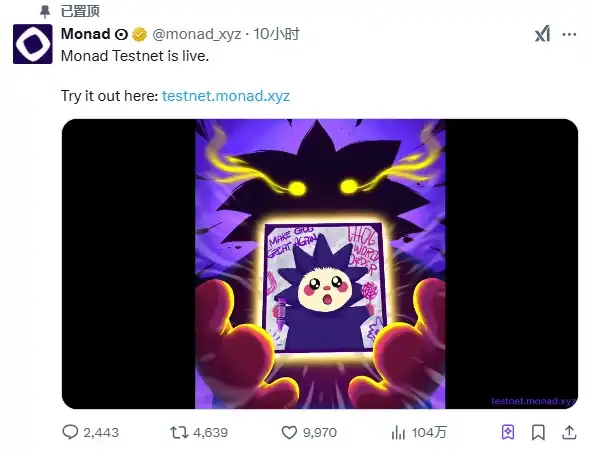
The Monad Testnet is now officially live
Next, Odaily Planet Daily will guide everyone through an overview of Monad and how to participate in the Monad Testnet interaction promptly.
Project Introduction
Monad, developed by the Pyth and Solana teams over more than two years, is a high-performance EVM-compatible L1 public chain. According to the official documentation, Monad defines itself as a PoS-based EVM-compatible high-performance L1 chain that aims to pioneer new public chain possibilities through the execution pipeline of Ethereum transactions. Its key innovations include MonadDB (a database designed specifically for Ethereum state access) and Optimistic Parallel Execution (ensuring high TPS with minimal overhead). By separating the consensus layer from the execution layer, Monad further enhances scalability, enabling developers to build applications that require outstanding performance and low latency.
Monad's groundbreaking progress has positioned it as a robust platform for enterprise-level applications, providing developers with the tools needed to create high TPS DApps while maintaining compatibility with Ethereum, embracing the future of blockchain innovation.
On the evening of April 9, 2024, Monad Labs announced a $30 billion valuation and completed a $225 million funding round led by Paradigm, with participation from Electric Capital and Greenoaks. As one of the most promising projects in the Layer 1 space, Monad, which emphasizes the concept of "Parallel EVM," aims to introduce a "parallel processing" execution layer scaling solution to significantly improve network execution efficiency while remaining 100% EVM bytecode compatible.
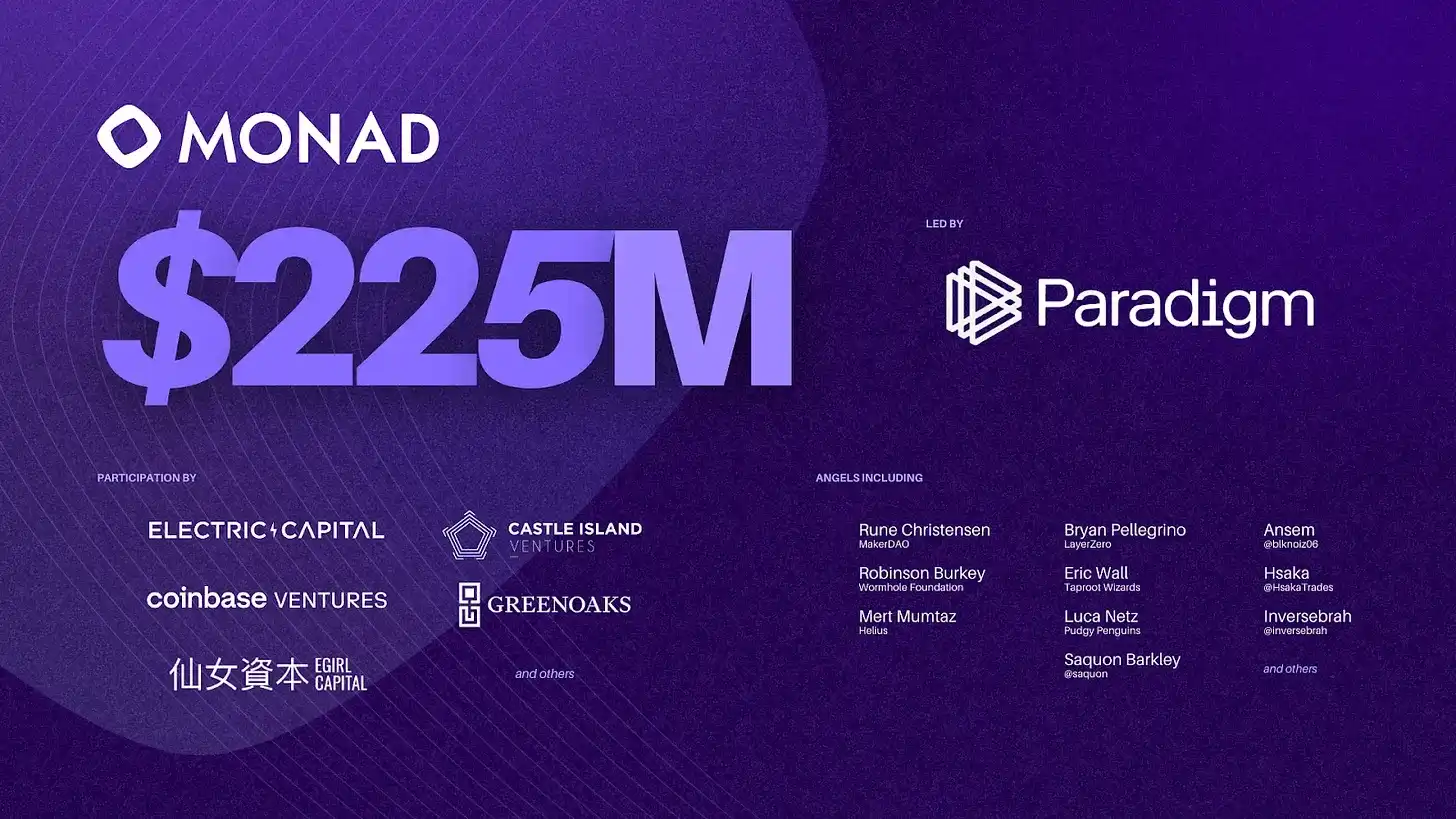
Monad Funding Status
Nexus: A Parallelized Proof-of-Stake Mining Network
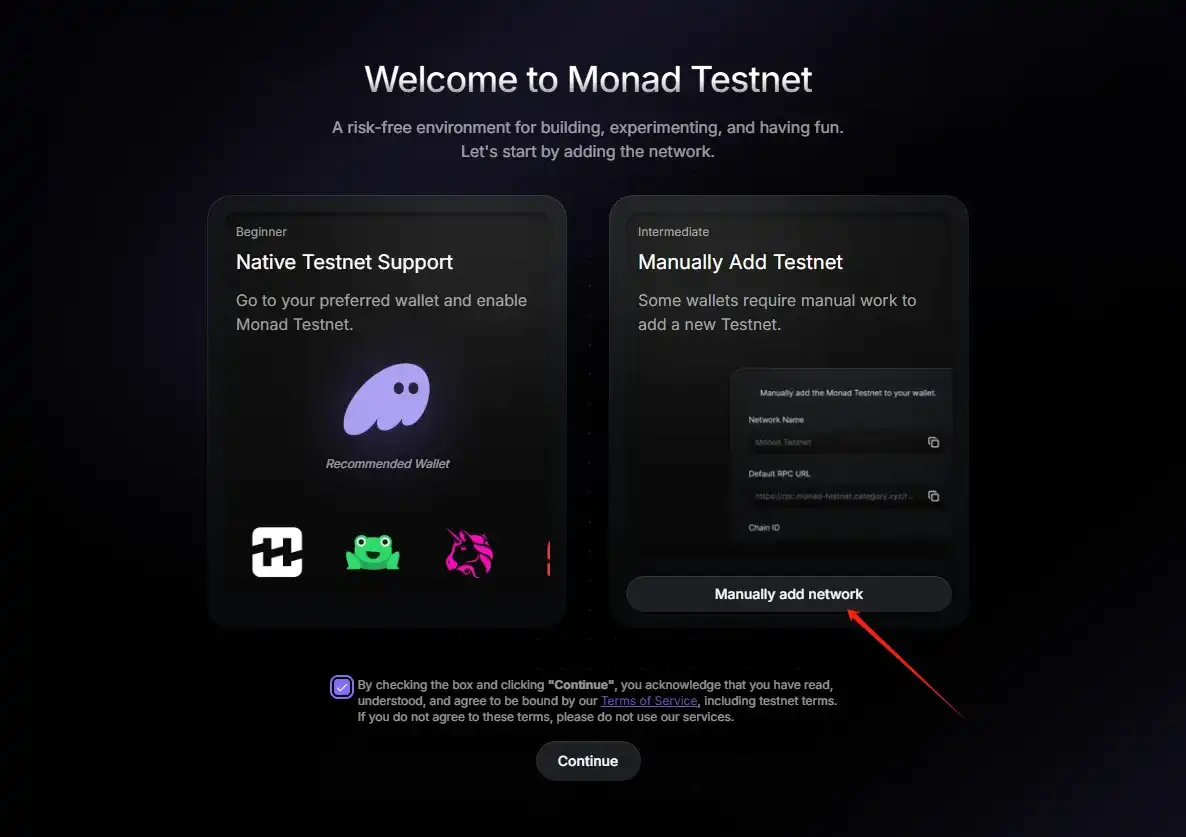
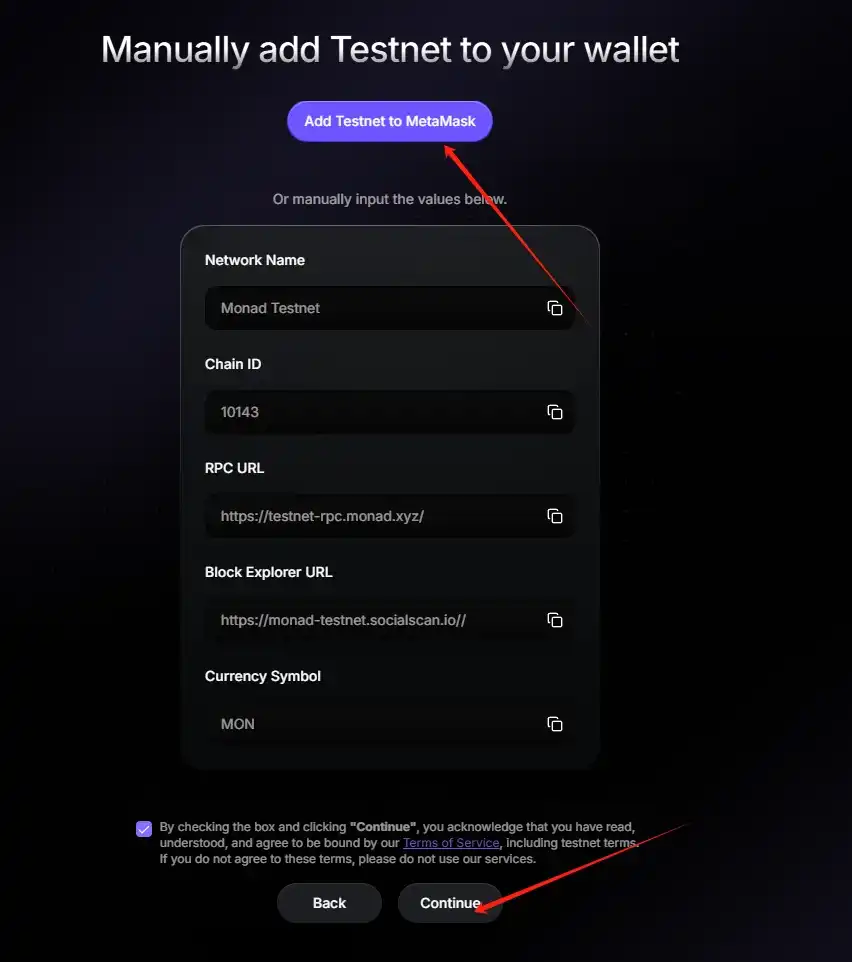
STEP 1. Add the Testnet (Link: https://testnet.monad.xyz/): Upon visiting the link, click on "Manually add network," then click on "Add Testnet to MetaMask," and finally click "Continue."
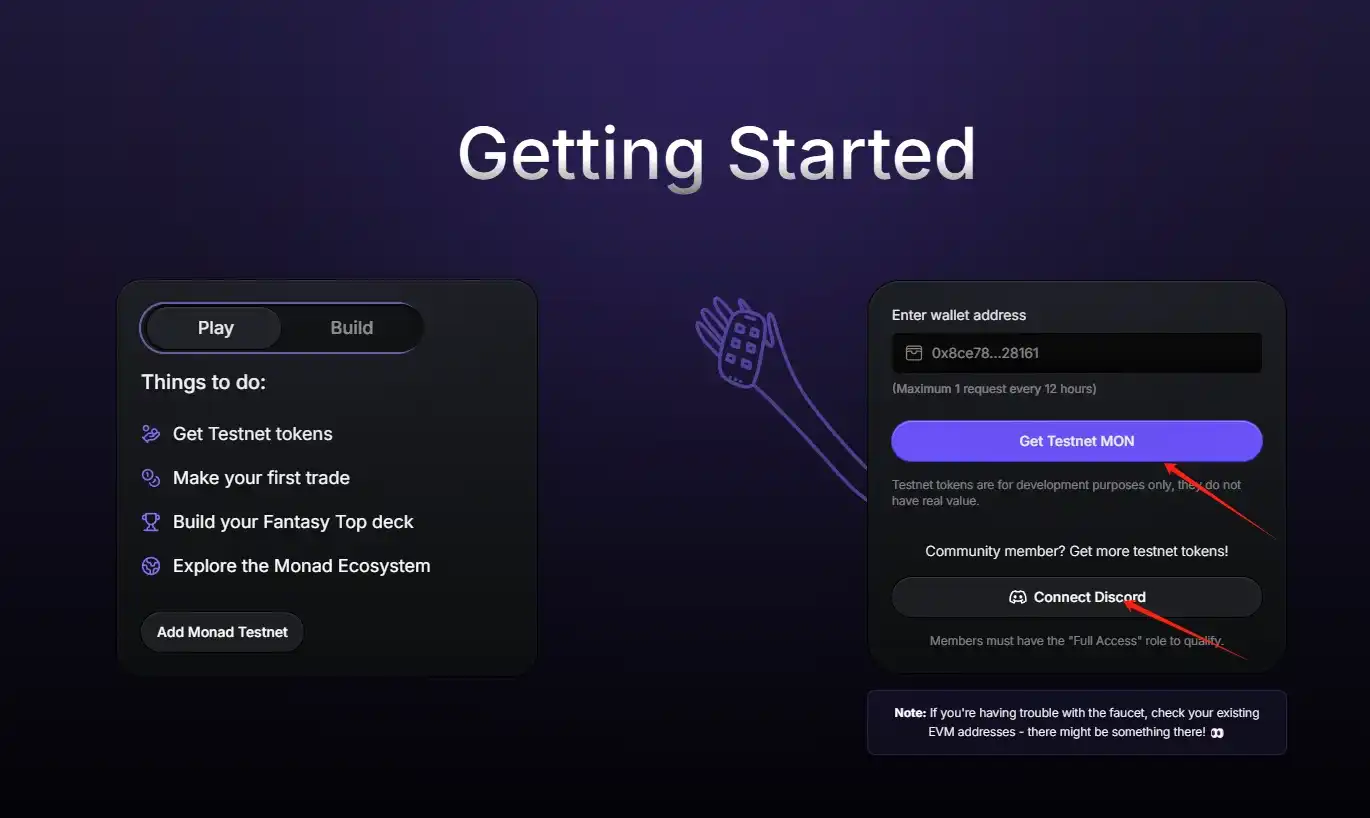
STEP 2. Claim Test Coins and Bind Discord Account: Click on "Connect Wallet," then fill in the test coin address in the dropdown and click "Get Testnet MON." Next, click on "Connect Discord" to authorize your Discord account. (Please note that the test coin claim process is still not fixed, but you can continue reading to understand the interactions you can perform after receiving the test coins.)
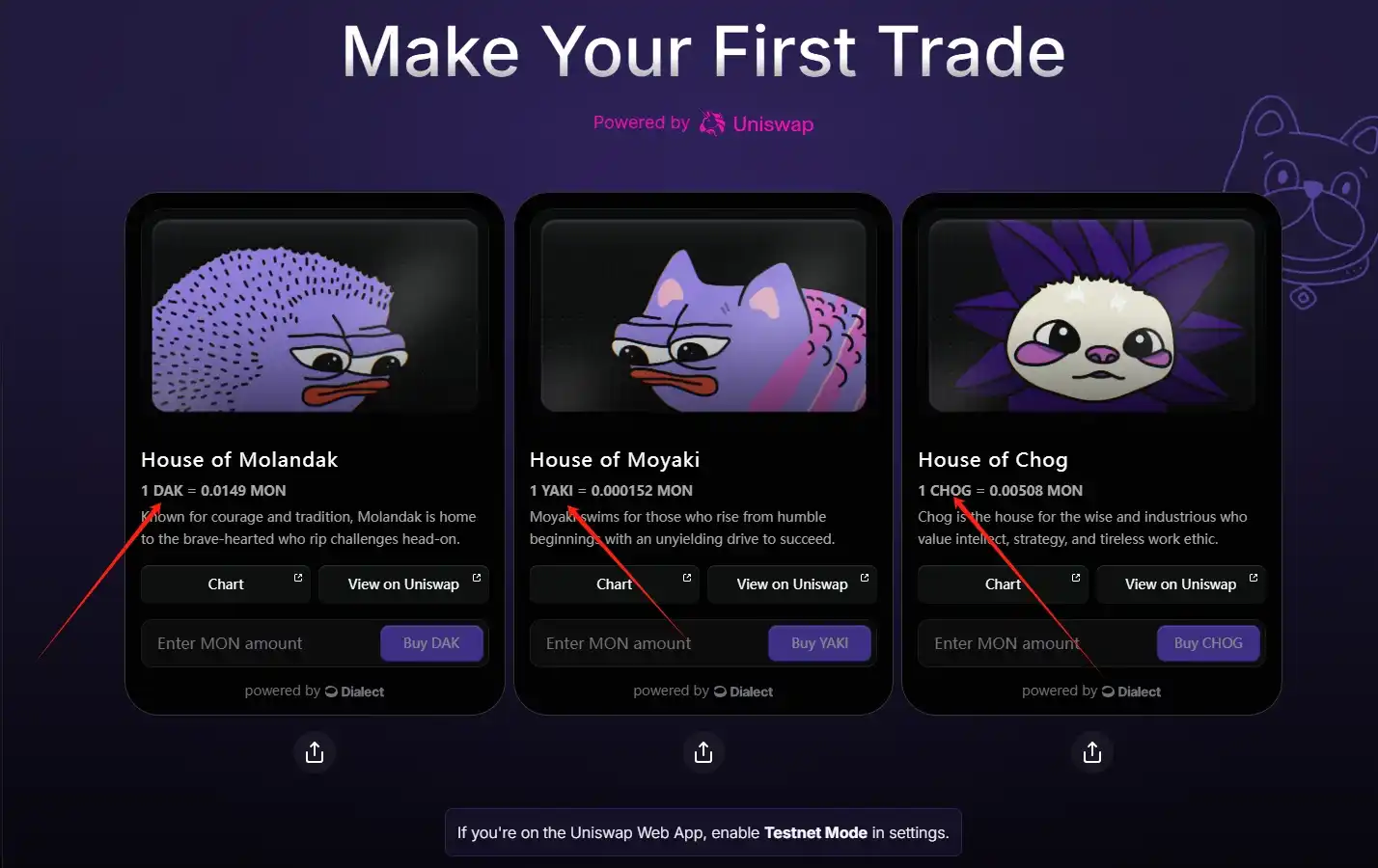
STEP 3. Proceed to the next screen and complete your first transaction on the testnet: Enter the desired amount of tokens to purchase in the three respective input boxes, buying DAK, YAKI, and CHOG tokens.
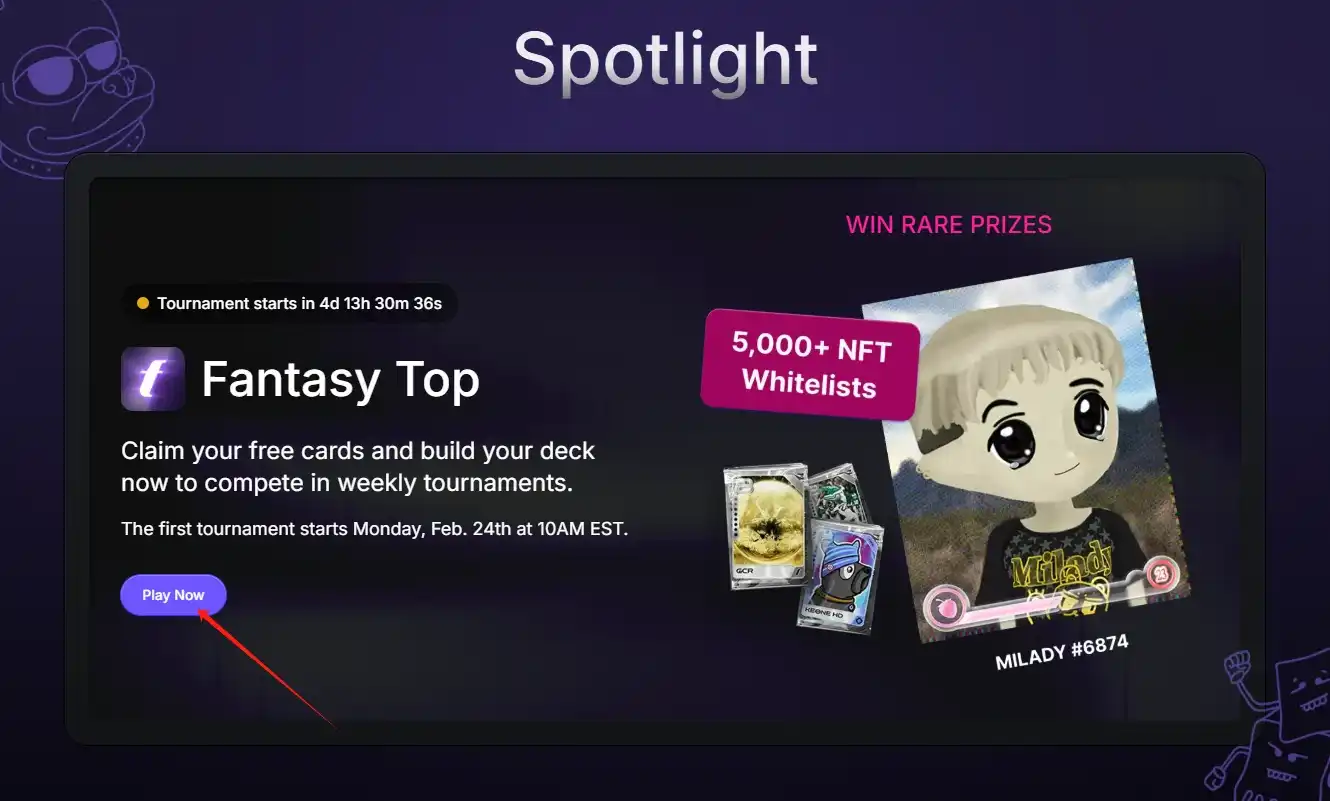
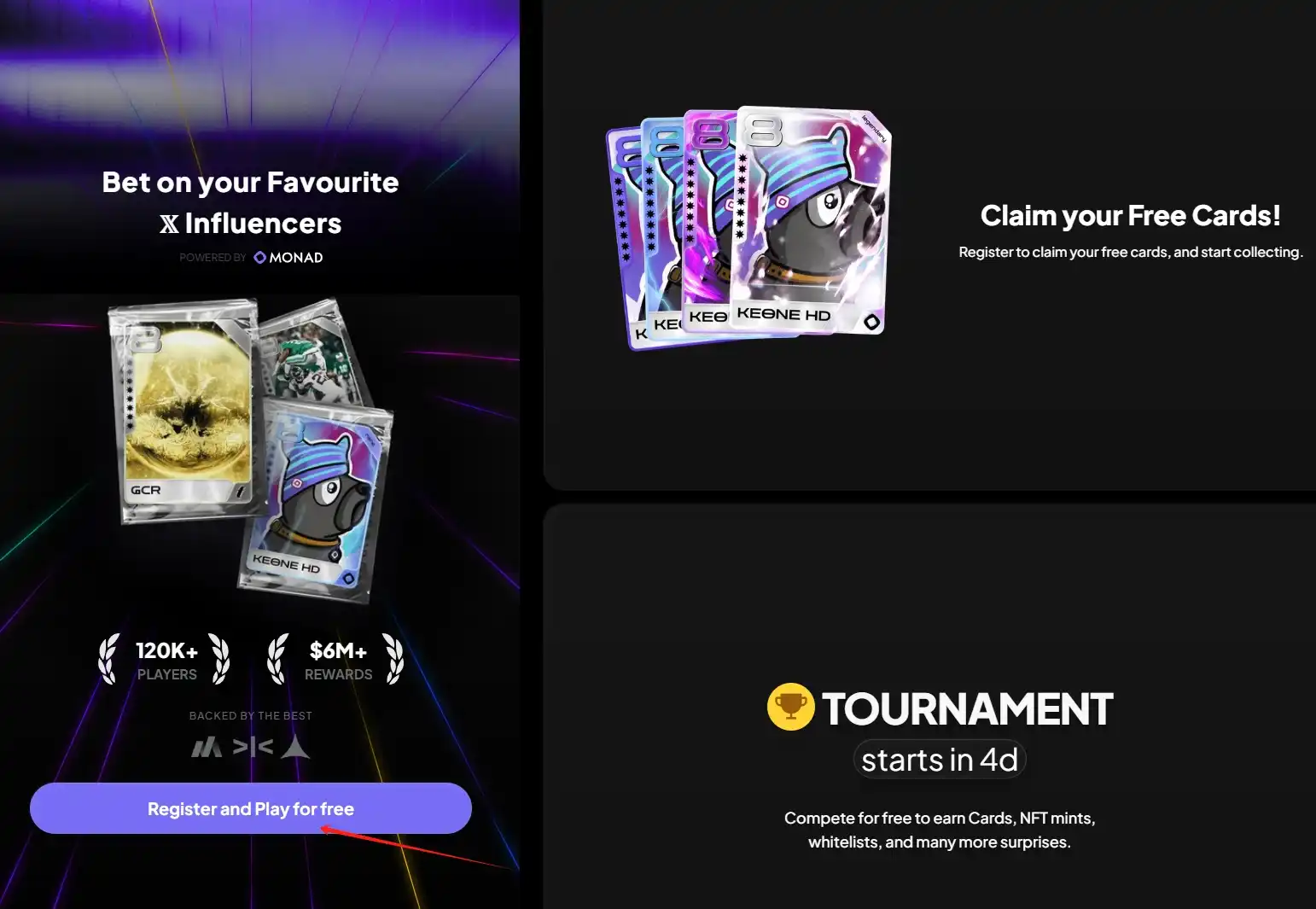
STEP 4. Continue to the next screen and complete the "Spotlight" task: Click on "Play Now," then click on "Register and Play for free" to log in using your Google account.
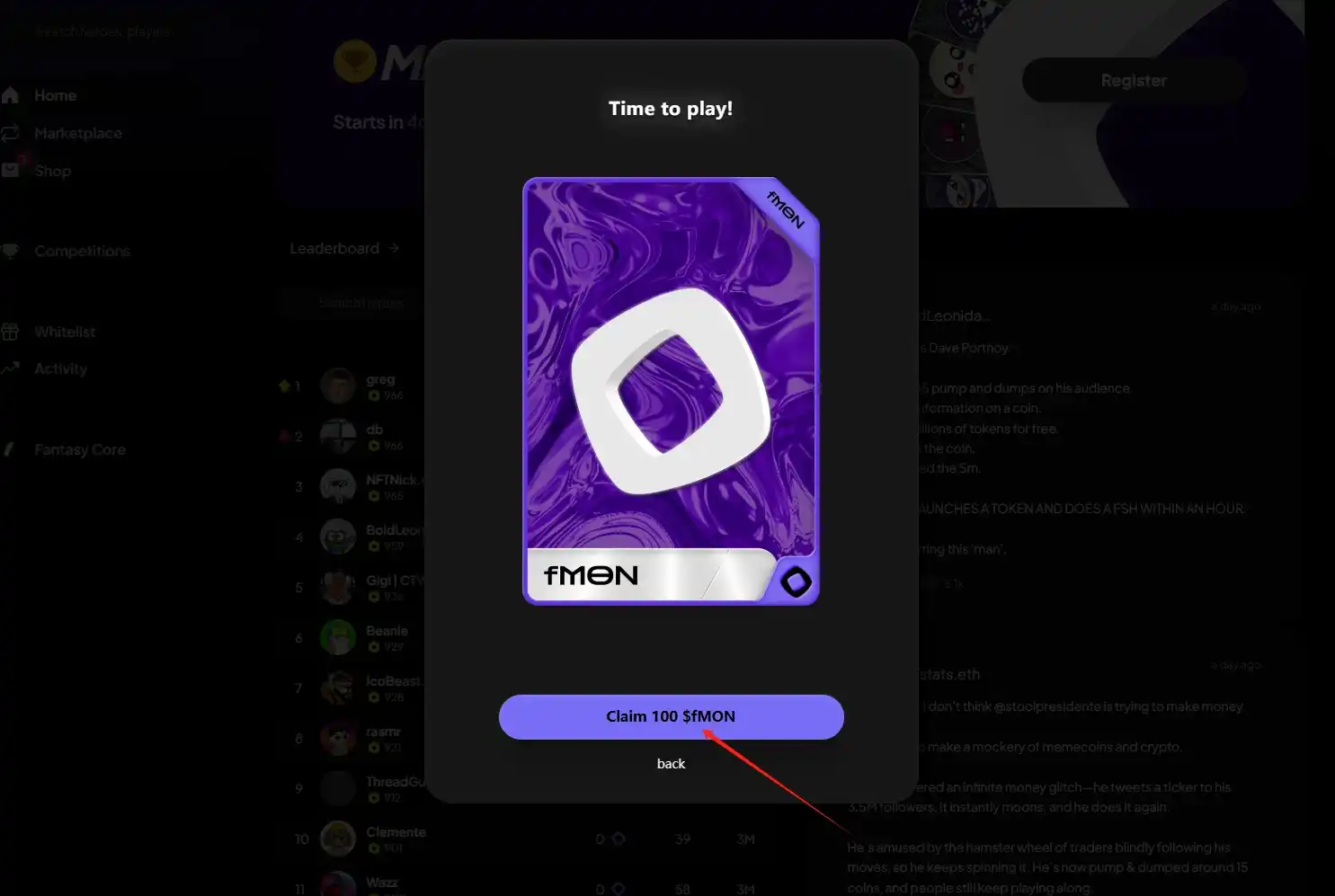
STEP 5. Upon successful login, keep clicking "Continue" until you see "Claim 100 $fMON."
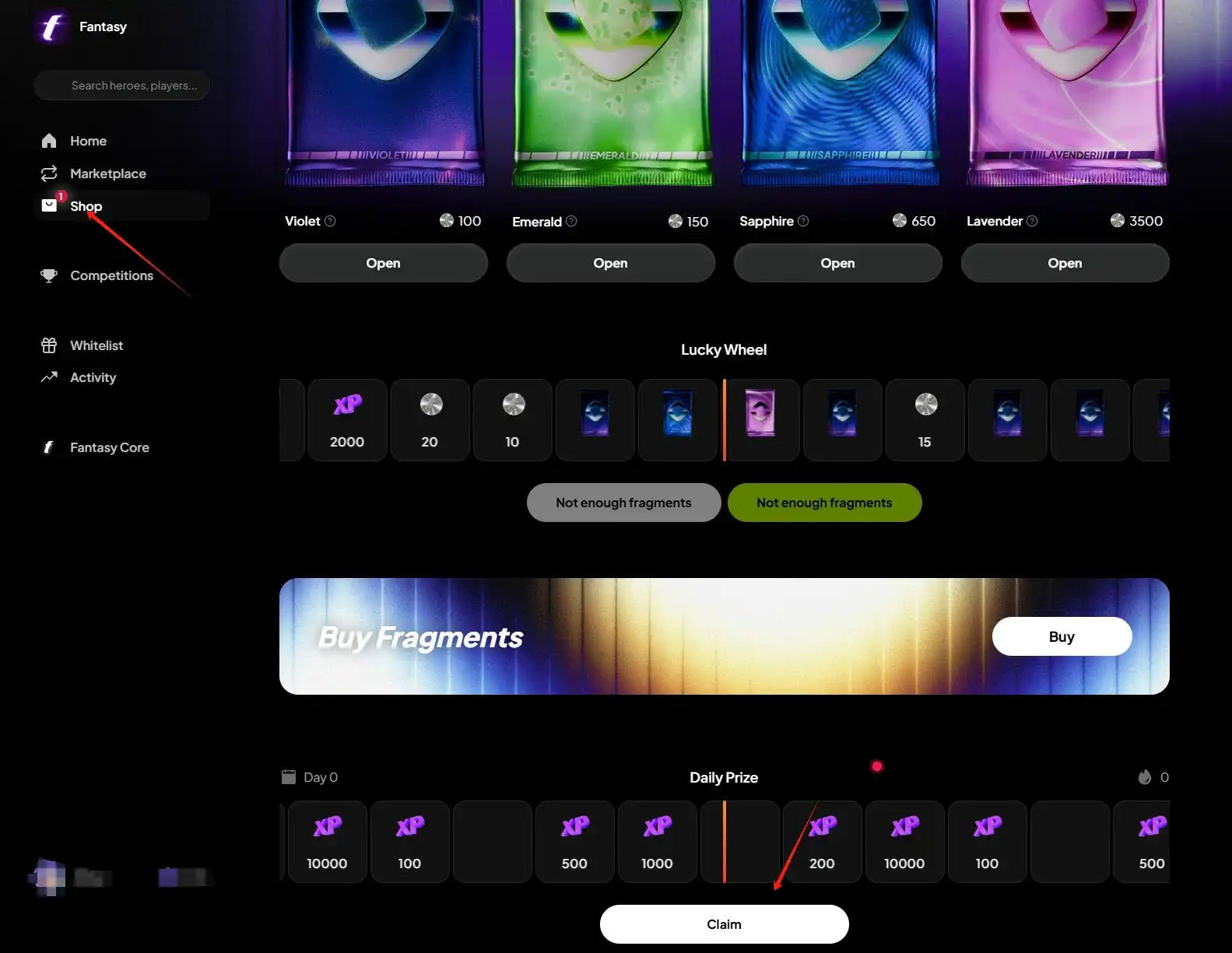
STEP 6. Click on "Shop," then click "Claim" to perform your daily check-in.
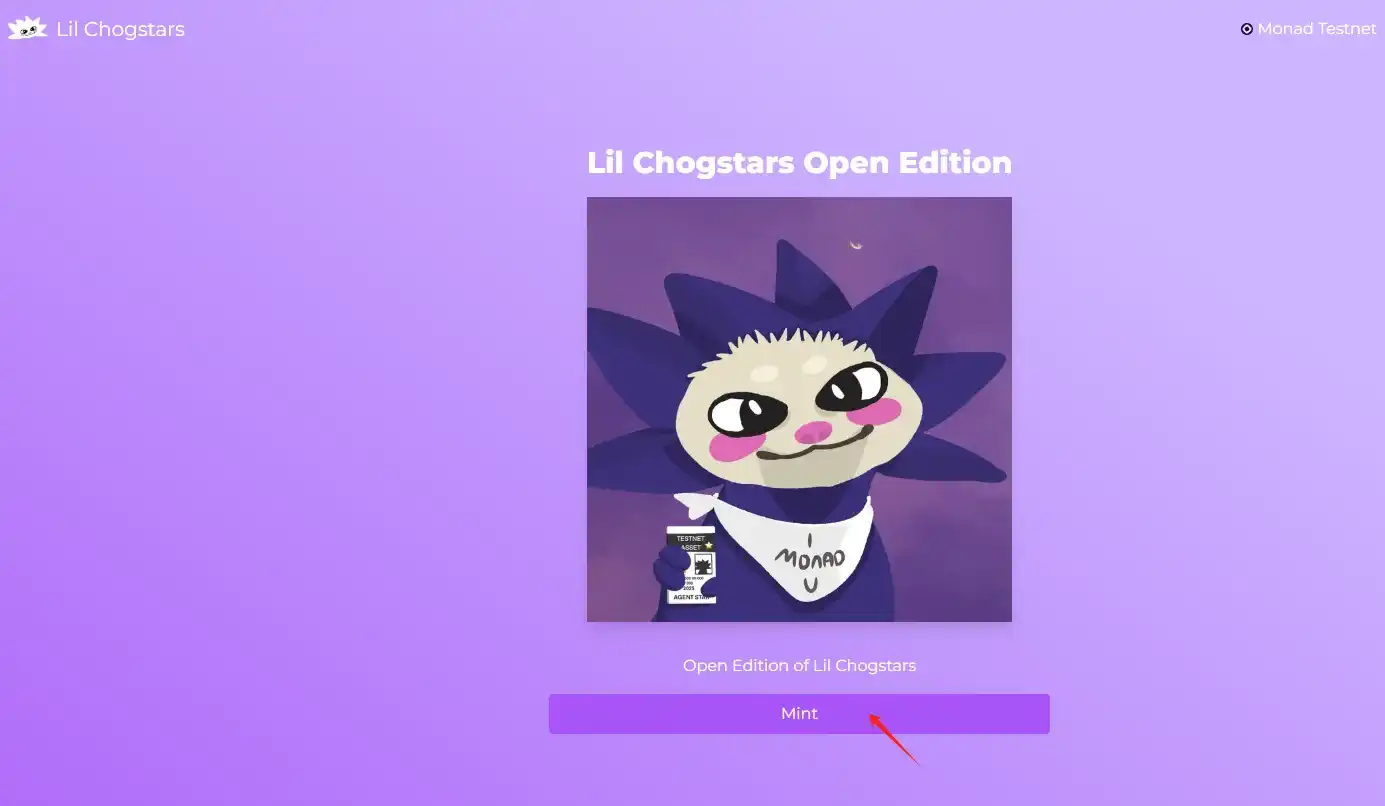
STEP 7. Visit the website (Link: https://testnet.lilchogstars.com/) and mint an NFT.
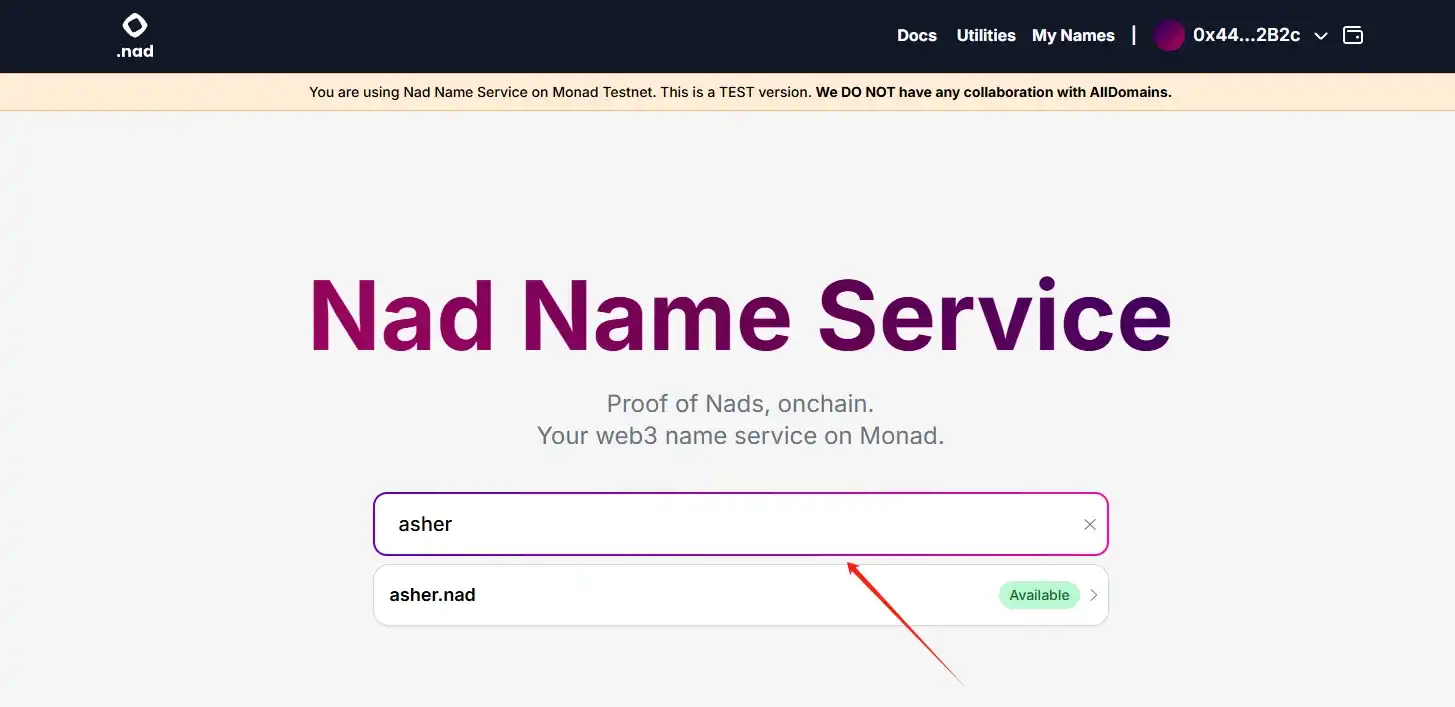
STEP 8. Click the website (link: https://app.nad.domains/), and register a domain name.
You may also like

SpaceX vs Tesla vs xAI: Which Elon Musk Trade Has the Biggest Upside in 2026?

OpenAI Reveals It Has Confidentially Submitted an S-1 to the SEC, Keeping the Door Open for a Future IPO
On June 9, according to an OpenAI announcement, the company recently confidentially submitted a draft S-1 registration statement to the U.S. Securities and Exchange Commission (SEC), beginning the preliminary compliance process for a potential initial public offering. OpenAI said it chose to disclose this proactively because it expected the news might leak; however, the company has not yet set a specific listing timeline, and related arrangements may still take some time.

Latest research from 13 top universities including Cornell University: The current state, challenges, and misconceptions of the fusion of Crypto and AI
Deconstructing Anthropic: The Best AI Company, Possibly Also a Type of Organizational Invention
Apollo and Blackstone Reportedly Back $35 Billion Anthropic Chip Financing as Deal Details Remain Unclear
On June 9, according to currently available news alerts, Apollo and Blackstone Group participated in a $35 billion financing for an Anthropic “chip project.” Based on the original wording of the report, the funding has already been raised, but public information remains limited. The financing structure, use of proceeds, project entity, and whether Apollo and Blackstone participated through equity, debt, or project financing have not yet been disclosed.

Humanity Protocol Security Incident Escalates: More Than $31 Million Stolen From Related Addresses as Attacker Continues Selling H for ETH
On June 9, according to monitoring by Onchain Lens, more than $31 million has been stolen from addresses linked to Humanity Protocol, and the attack is still ongoing, with the hacker continuously swapping H tokens for ETH. Project founder Terence Kwok later confirmed the security incident on X, saying the issue involved a private key leak.

Bloomberg: As Bitcoin Weakens, Stablecoins and RWA Continue to Drive Expansion in Crypto Businesses
In June, Bloomberg reported that despite Bitcoin falling below $60,000 last week, wiping out about $235 billion in market value within seven days, and dropping close to 50% from last year’s peak, some core businesses in the crypto industry are still expanding, mainly in stablecoins, real-world asset tokenization (RWA), payments, and infrastructure. The report also noted that overall altcoin activity has contracted significantly: altcoin market capitalization has fallen from a peak of about $431 billion in November 2021 to around $170 billion, and among the tens of millions of tokens issued in recent years, fewer than 1,700 still maintain meaningful trading activity.

Galaxy Deep Research Report: How Hyperliquid's HIP-4 Upgrade Changes the Landscape of Prediction Markets?
Binance Research: RWA Market Expected to Expand Nearly 6x from Early 2025, with Public Equities and Onchain Payments Heating Up Together
In June, Binance Research said in its monthly market report that the real-world asset (RWA) market is expected to grow by about 589% from the beginning of 2025. Bond- and money market fund-related RWA expanded by about $6.5 billion, up 83% year over year, while publicly traded equity RWAs grew by about 422%. The report also noted that monthly crypto debit card transaction volume exceeded $747 million in May, up 48.6% year to date.

Japan to Assess a Framework for Yen Stablecoins and Crypto ETFs as Asia’s Compliant Payments Narrative Heats Up
Recently, according to the original report, Japan is considering the launch of yen stablecoins and cryptocurrency ETFs. Public information remains limited at this stage, and there is still no complete policy text, regulatory draft, or clear implementation timeline, so this is better characterized as a “policy discussion” rather than formal implementation. The original wording also noted that advancing stablecoin regulation in Asia is driving XRP usage and supporting growth in the XRPL ecosystem. However, based on currently available public information, there is not enough evidence to directly establish a clear causal relationship between this round of discussion in Japan and XRP or XRPL.
ZachXBT: Humanity private key leak and abnormal surge in H token should be viewed separately
On June 9, according to related disclosures, on-chain investigator ZachXBT posted an update on Humanity’s roughly $31 million security incident, saying that after further analyzing fund flows, he currently tends to believe the project team was not involved in an “inside job” or a self-staged attack. According to him, the official explanation about the private key leak was broadly accurate, but before the token unlock, the price of H had been artificially pushed higher, and the hacker later took advantage of that market environment; therefore, the private key leak and the earlier abnormal price pumping should be regarded as two separate and independent events. This reframing has shifted the market’s understanding of the nature of the incident. Earlier discussion around Humanity had focused on whether the team directly participated in the attack or used the security incident to cover up internal operations. ZachXBT’s latest remarks shift the focus from “whether it was self-theft” to “whether there were pre-unlock market structure issues.” He also questioned whether the team may have.

Morning Report | OpenAI has submitted an S-1 registration statement draft to the U.S. SEC; Morpho completes $175 million financing

Morning Report | BitMine increased its holdings by 126,971 ETH last week; trader Eugene announced his exit from the crypto market

Wang Chuan: How can one not feel anxious after the neighbor Old Wang made thirty times profit by investing in storage stocks? (Seven) - A quarter-century cycle
Cryptocurrency CEXs are flocking to sell US stocks, and traditional brokerages are facing an "uninvited guest."
$75 billion in foreign capital has fled, and South Korean retail investors have absorbed it all using leverage

Japan’s Three Megabanks Plan Joint Stablecoin Issuance in Fiscal 2026
MUFG, SMBC, and Mizuho reportedly plan to jointly issue fiat-pegged stablecoins in fiscal 2026, signaling Japan’s growing push into bank-led digital payment infrastructure.

Humanity Discloses H Token Dual-Chain Attack Details, With Losses on Ethereum and BSC Exceeding $36 Million
Humanity said the H token attack across Ethereum and BSC caused more than $36 million in losses after leaked ProxyAdmin keys enabled malicious contract upgrades and token minting.
SpaceX vs Tesla vs xAI: Which Elon Musk Trade Has the Biggest Upside in 2026?
OpenAI Reveals It Has Confidentially Submitted an S-1 to the SEC, Keeping the Door Open for a Future IPO
On June 9, according to an OpenAI announcement, the company recently confidentially submitted a draft S-1 registration statement to the U.S. Securities and Exchange Commission (SEC), beginning the preliminary compliance process for a potential initial public offering. OpenAI said it chose to disclose this proactively because it expected the news might leak; however, the company has not yet set a specific listing timeline, and related arrangements may still take some time.
Latest research from 13 top universities including Cornell University: The current state, challenges, and misconceptions of the fusion of Crypto and AI
Deconstructing Anthropic: The Best AI Company, Possibly Also a Type of Organizational Invention
Apollo and Blackstone Reportedly Back $35 Billion Anthropic Chip Financing as Deal Details Remain Unclear
On June 9, according to currently available news alerts, Apollo and Blackstone Group participated in a $35 billion financing for an Anthropic “chip project.” Based on the original wording of the report, the funding has already been raised, but public information remains limited. The financing structure, use of proceeds, project entity, and whether Apollo and Blackstone participated through equity, debt, or project financing have not yet been disclosed.
Humanity Protocol Security Incident Escalates: More Than $31 Million Stolen From Related Addresses as Attacker Continues Selling H for ETH
On June 9, according to monitoring by Onchain Lens, more than $31 million has been stolen from addresses linked to Humanity Protocol, and the attack is still ongoing, with the hacker continuously swapping H tokens for ETH. Project founder Terence Kwok later confirmed the security incident on X, saying the issue involved a private key leak.


