
Hands-on Tutorial: Quickly Mastering the Viewing Method of Meteora Liquidity Range Price (Note: You may need to adapt "Meteora" to the actual name of the protocol or platform being referenced.)


Original Title: "Hands-on Tutorial: Quickly Mastering the Method to View Meteora Liquidity Price Range"
Original Author: Zibu, Crypto KOL
Meteora is a DeFi project on the Solana blockchain, focusing on building an efficient, sustainable, and flexible liquidity layer for the Solana ecosystem. Its goal is to address the liquidity shortage on Solana, making transactions smoother, costs lower, and providing liquidity providers with better returns.
Meteora's pools mainly consist of DLMM pools and Dynamic Pools, where both bilateral pools and unilateral pools can be added in DLMM pools. Developers can utilize unilateral pools for unloading and absorbing, such as the trump/sol trading pair. When the price rises, developers can add $trump's unilateral pool at a higher price range, and when the price reaches this range, $trump will automatically be exchanged for $sol for unloading, while still receiving fees. When the price falls, developers can add $sol's unilateral pool at a lower price range, and when the price drops to this range, $trump will be automatically bought to achieve the absorption purpose.
If we want to know at what price developers use unilateral pools for unloading and absorbing, then knowing their corresponding price range is essential.
1. Basic Concepts
Website: https://app.meteora.ag/
1. Trading Pair
Any two tokens form a trading pair, such as $trump and $sol forming the trump-sol trading pair, or $trump and $usdc forming the trump-usdc trading pair.
2. Pool (LP Pool)
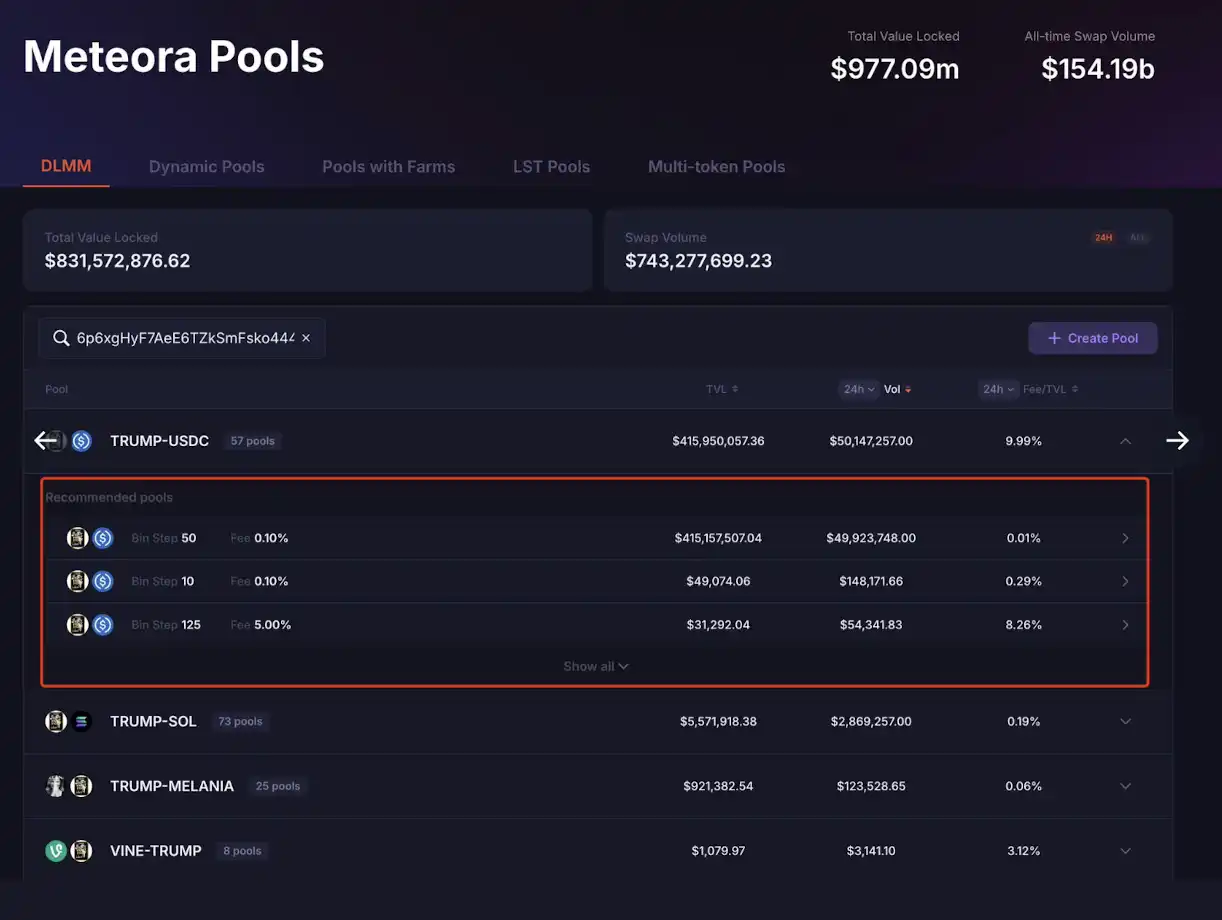
Under each trading pair, there can be multiple pools, each pool distinguished by Bin Step and Fee. For example, under the trump-usdc trading pair, there are 57 pools, each pool corresponding to a unique address, like
3. Bin
In DLMM, each bin represents a price, and each bin is a buy order or sell order placed at a specific price.
4. Bin Step
The bin step refers to the price interval between two adjacent bins, calculated in basis points (1 basis point = 0.01%). It determines the density of bins and the granularity of liquidity distribution and is set by the pool creator.
For example:
Let's say the current price of SOL/USDC is $20, and the bin step is set to 25 basis points (0.25%).
The price of the next bin would be $20 × 1.0025 = $20.05, and the one after that would be $20.05 × 1.0025 ≈ $20.10, and so on.
5. Position
A position is used to describe how a liquidity provider allocates funds to a specific price range, with each position corresponding to a unique address. Positions are created within a pool, and a pool can have multiple different positions.
A position typically includes the following key elements:
(1) Price Range
Each position has a distinct price range that represents the price range the liquidity provider wishes to support, consisting of a series of contiguous bins.
(2) Investment Amount
The quantity of two tokens (such as SOL and USDC) provided. Meteora will calculate the specific ratio of each token based on the current price and the range to ensure meeting the pool's needs.
(3) Distribution Strategy
· Spot (Even Distribution): Funds are evenly distributed across each bin, suitable for scenarios with low expected price volatility.
· Curve (Bell-shaped Distribution): Funds are concentrated around the current price, with less allocation as the price moves further away from the current price, forming a bell-shaped curve, suitable for LPs who wish to focus on the current price.
· Bid-Ask (Two-Way Spread): Funds are concentrated on both sides of the current price, forming two peaks, suitable for high-volatility markets.
(4) Bin Step: Users cannot change the bin step when creating a position; this is set when creating the pool.
II. Connect Wallet for Viewing
Meteora supports connecting a wallet address to view held positions and also supports viewing as a watch-only wallet. With this feature, we can view the price range of a pool.
Using $trump (6p6xgHyF7AeE6TZkSmFsko444wqoP15icUSqi2jfGiPN) as an example.
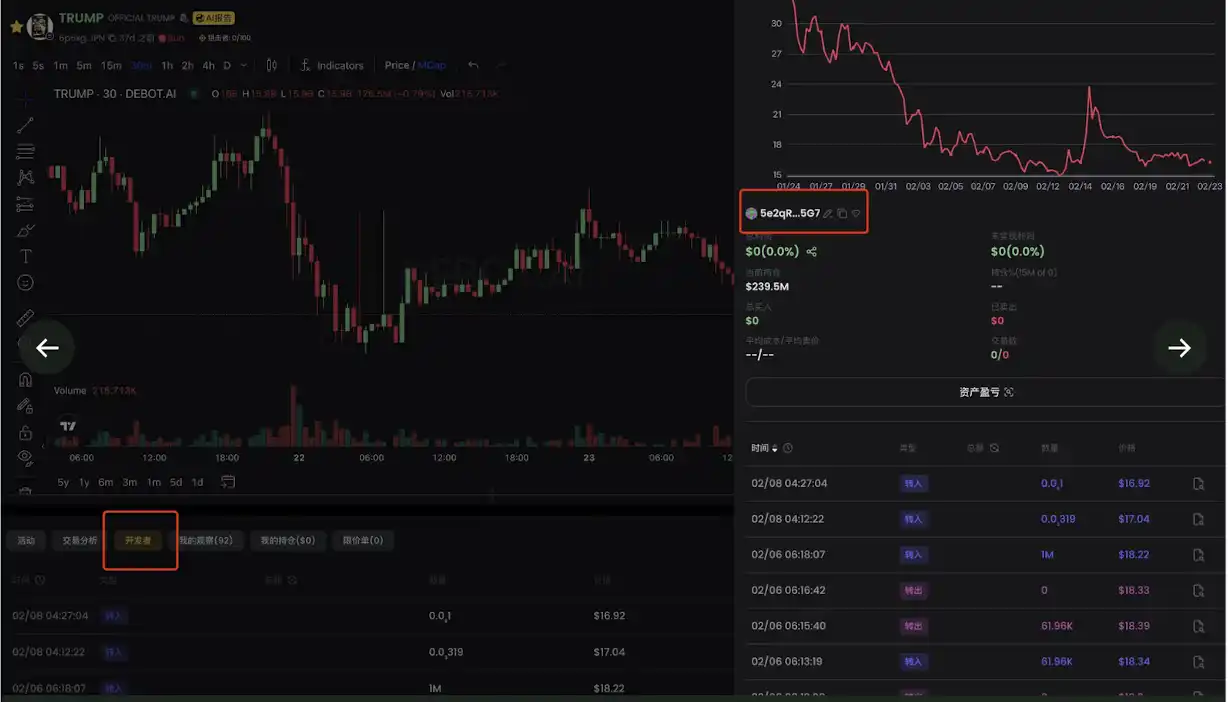
First, we open the DeBot (https://debot.ai), enter $trump's CA, and find the dev's address 5e2qRc1DNEXmyxP8qwPwJhRWjef7usLyi7v5xjqLr5G7, as shown in the image
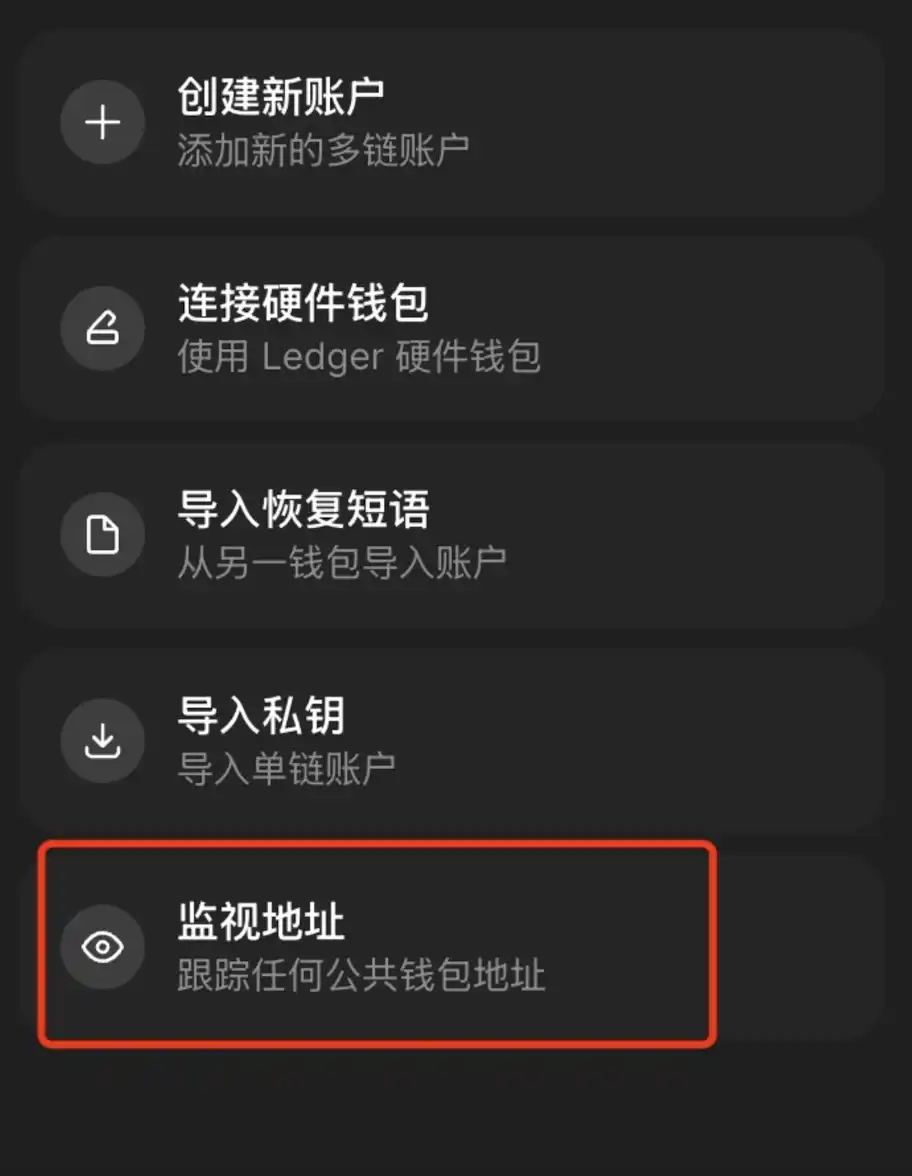
Then, open the Phantom wallet, go to [Add/Connect Wallet] - [Watch Address], enter the "Name" and "Address," filling in the dev's address 5e2qRc1DNEXmyxP8qwPwJhRWjef7usLyi7v5xjqLr5G7 here.
Finally, open Meteora, connect the Phantom wallet, and click [Portfolio] at the top to see all the added pools. Click on any DLMM pool to display the pool details and all positions, as shown in the image
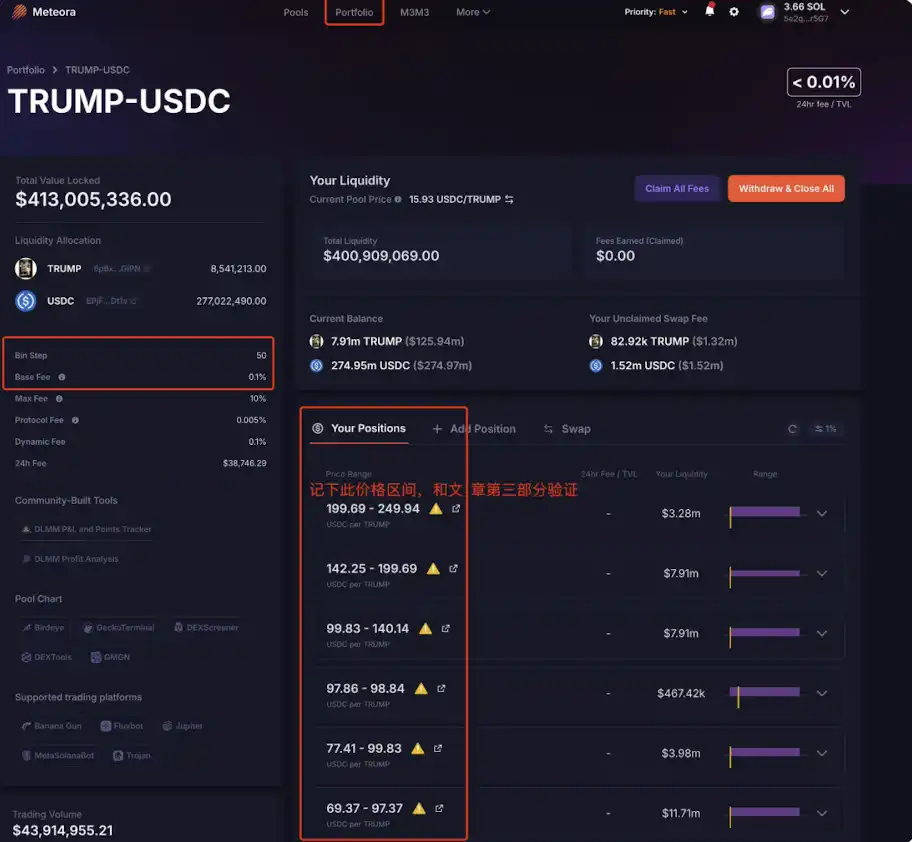
The Bin Step and Base Fee on the left side of the image are the current pool's information, while the middle part shows positions in different price ranges. Clicking on a position shows the current balance, unclaimed fees, distribution strategy, and other information.
The advantage of viewing price ranges in this way is that it is convenient and intuitive, listing all existing position data. The downside is that it cannot be viewed once liquidity has been removed.
III. On-Chain Data Calculation
We can calculate the price range of each position using on-chain data, regardless of whether the position still exists.
The Meteora documentation provides the following calculation formulas:
· Minimum Price of the Price Range: min_price = (1 + bin_step/10000) ^ lower_bin_id
· Maximum Price of the Price Range: max_price = (1 + bin_step/10000) ^ upper_bin_id
If a trading pair is represented as A/B, where the precision of token A is decimals_A and the precision of token B is decimals_B, then the final calculation formulas are:
· Minimum Price of the Price Range: min_price = (1 + bin_step/10000) ^ lower_bin_id / 10^(decimals_B-decimals_A)
· Maximum Price of the Price Range: max_price = (1 + bin_step/10000) ^ upper_bin_id / 10^(decimals_B-decimals_A)
It is important to note that the calculated price here is the price of token A relative to token B. If you want to view the price of token A relative to USD, you will also need to query the USD price of token B and then perform the conversion.
From the above formulas, it is clear that to calculate the data, we need to know the bin_step of a pool, the lower_bin_id and upper_bin_id of a position, and also the precisions of the two coins in the trading pair.
Continuing with the example of $trump (6p6xgHyF7AeE6TZkSmFsko444wqoP15icUSqi2jfGiPN), we calculate the price range of a single-sided pool for this developer.
We open Solscan, enter the dev address of $trump (https://solscan.io/account/5e2qRc1DNEXmyxP8qwPwJhRWjef7usLyi7v5xjqLr5G7?activity_type=ACTIVITY_TOKEN_ADD_LIQ&page=5#defiactivities), open the Defi Activities tab, filter Action by "ADD LIQUIDITY," and in the Amount column, we can see that all listed add liquidity transactions are for single-sided pools, either only adding $trump or only adding $usdc. This article uses the last transaction in the image as an example, as shown in the image.
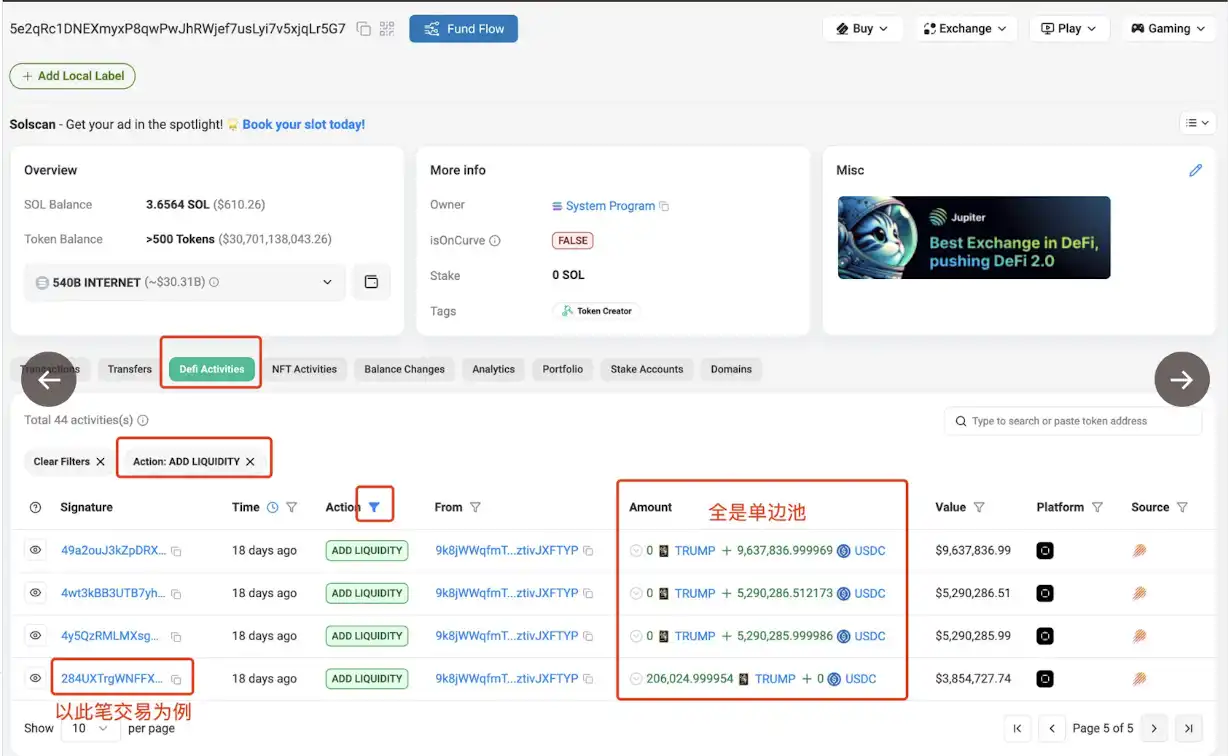
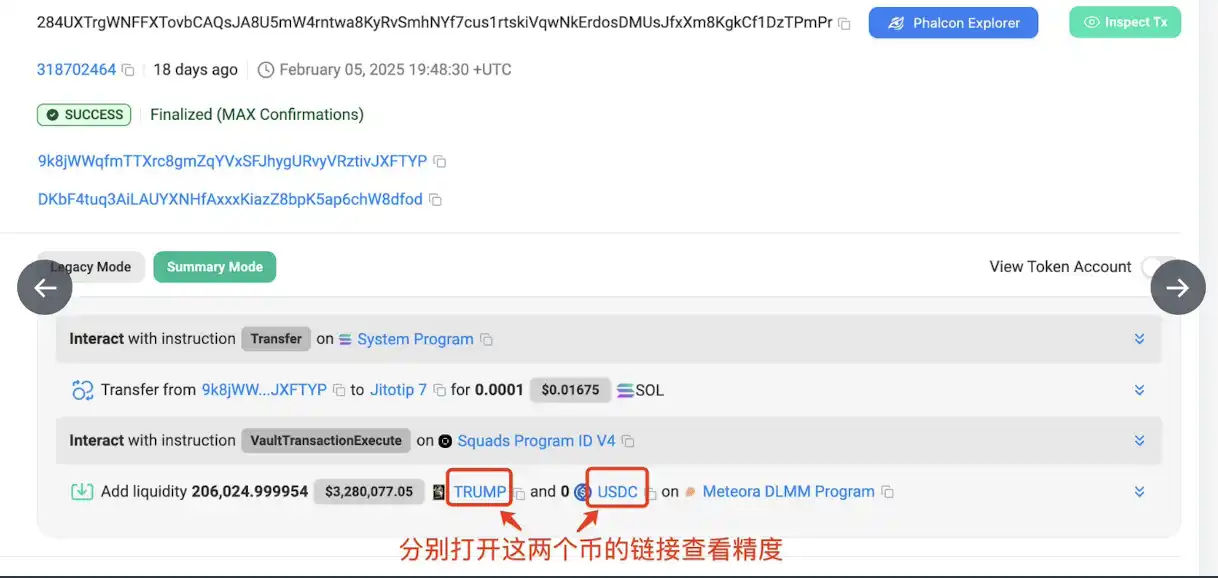
Open the last transaction in the above image (https://solscan.io/tx/284UXTrgWNFFXTovbCAQsJA8U5mW4rntwa8KyRvSmhNYf7cus1rtskiVqwNkErdosDMUsJfxXm8KgkCf1DzTPmPr), and view the transaction details. You can see that this pool addition only added $trump, as shown in the image.
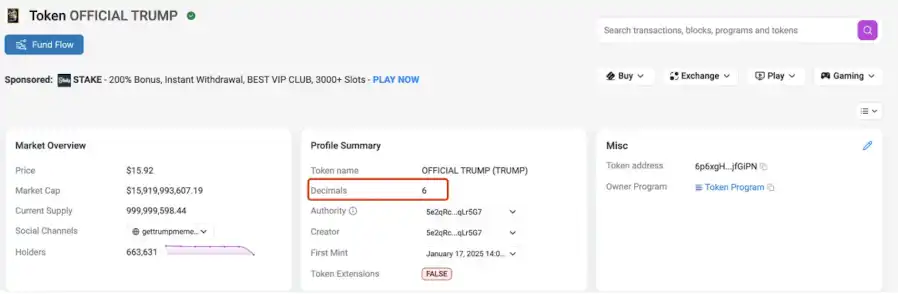
If we open the links for $trump and $usdc respectively, we can see that the precision of $trump is 6, and the precision of $usdc is also 6, as shown in the image.
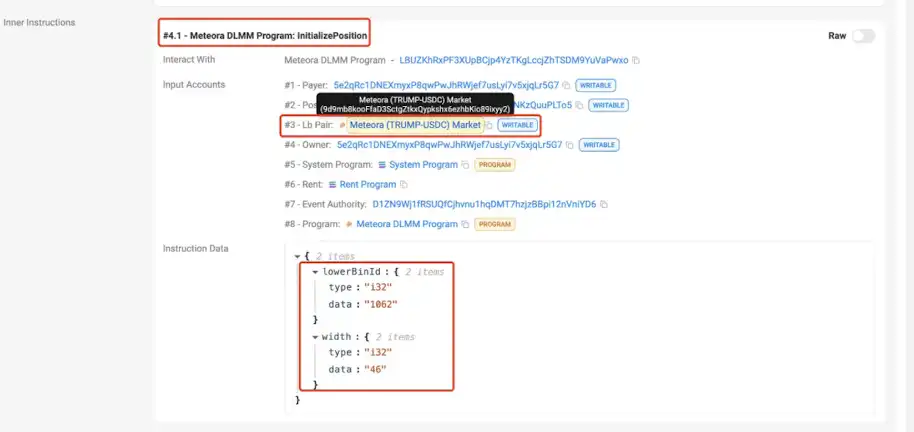
Scroll down on the transaction details page, and under [#4.1 - Meteora DLMM Program: initializePosition], you can see that lowerBinId is 1062, the width of the bin (i.e., count) is 46, and the pool address is 9d9mb8kooFfaD3SctgZtkxQypkshx6ezhbKio89ixyy2, as shown in the image. From the above information, we can calculate that the upperBinId=lowerBinId + width - 1 = 1062+46-1 = 1107.
On Solscan, open the pool address 9d9mb8kooFfaD3SctgZtkxQypkshx6ezhbKio89ixyy2 (https://solscan.io/account/9d9mb8kooFfaD3SctgZtkxQypkshx6ezhbKio89ixyy2), click on the "Data" tab, and switch "LbPair" to "Table". You can find that the binStep value is 50, as shown in the image.
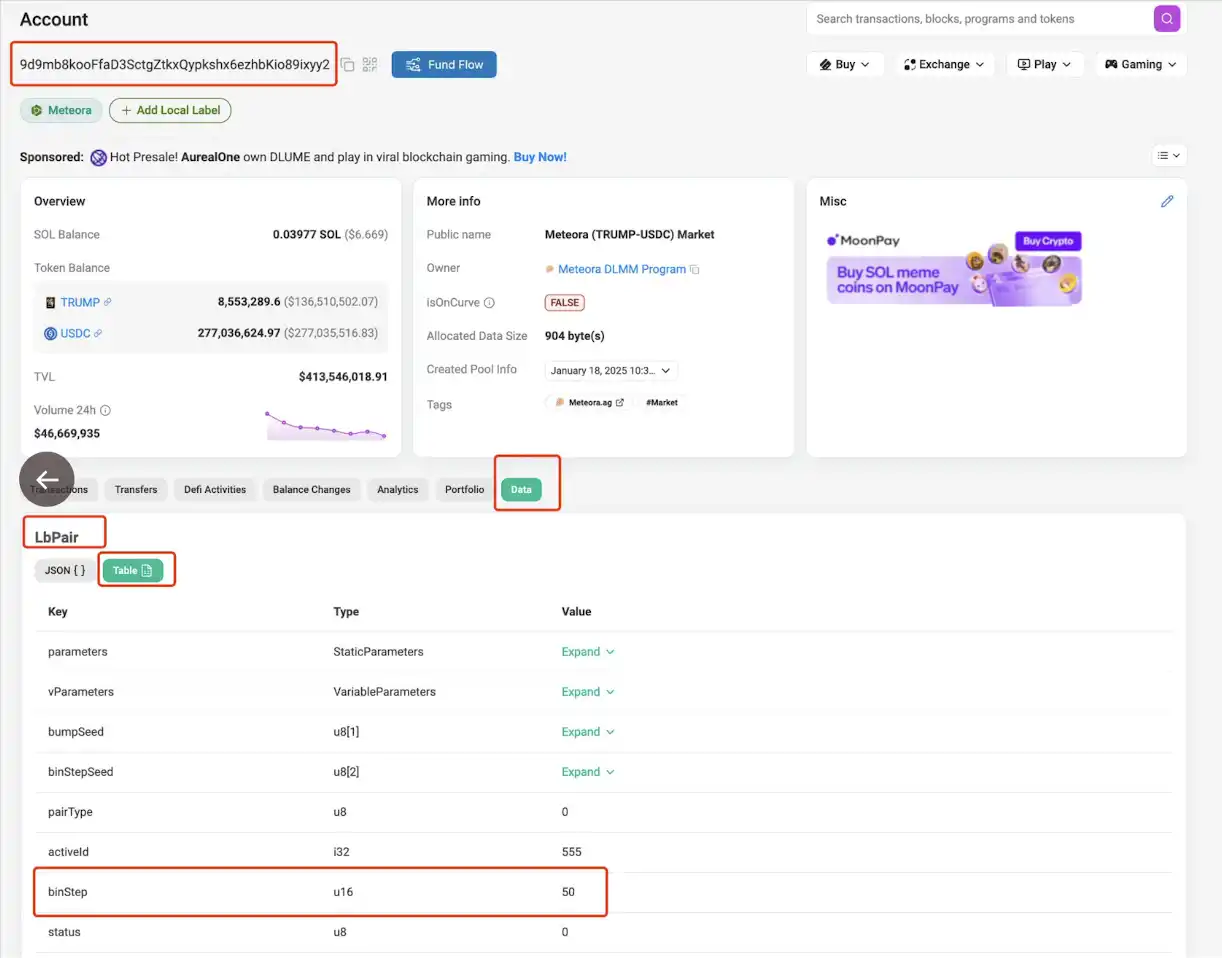
From the above information, we can obtain all the data needed for the calculation formula:
bin_step=50
lower_bin_id=1062
upper_bin_id=1107
decimals_A=6
decimals_B=6
We can then calculate
· Minimum value of the price range: min_price = (1 + bin_step/10000) ^ lower_bin_id/10^(decimals_B-decimals_A) = (1 + 50/10000) ^ 1062 / 10^(6-6) = 199.6905832
· Maximum Value of Price Range: max_price = (1 + bin_step/10000) ^ upper_bin_id/10^(decimals_B-decimals_A) = (1 + 50/10000) ^ 1107 / 10^(6-6) = 249.9368917
The calculated price range is identical to the price range in the second part of the image.
IV. Summary
Combining it with monitoring tools, when we observe a developer or another large holder adding to a one-sided pool, we can use the above method to calculate the price range at which they are preparing to unload or accumulate, and then make decisions in conjunction with candlestick charts and other data. Argentine President Mile's $libra also used the one-sided pool addition to unload, and you can replay the price range at which he added liquidity at that time using the method described above.
The tools I often use are debot (@taokamao, @Diting188), gmgn (@gmgnai, @haze0x), and okx (@DegenYin, @0x_KevinZ, @mia_okx). However, these three tools are not very convenient for viewing liquidity. Some ideal and useful features are:
1. List all of the developer's actions, including deposits, withdrawals, adding liquidity, and removing liquidity, and be able to identify and indicate transactions involving locking, adding, or removing liquidity in deposits and withdrawals.
· debot can identify all deposits and withdrawals but not adding or removing liquidity;
· gmgn can identify adding and removing liquidity but cannot recognize the developer's deposits and withdrawals, and it also does not identify the developer's transactions of adding or removing liquidity in the coin trump;
· okx has a function for liquidity pool changes, which separately lists adding and removing liquidity, but it also does not identify the developer's transactions of adding or removing liquidity in the coin trump.
2. For each liquidity addition and removal, provide a specific price range so that manual calculation is not required.
3. When calculating the developer's profit data, include the received fees and the fund's changes upon removing liquidity so that manual tracking of profit situation is not needed.
This feature is mainly possible to implement by debot and gmgn, as they have calculated the profit data for each address.
Looking forward to these tools becoming more and more user-friendly!
Trading Tools:
The most powerful AI signal trading and monitoring tool debot: https://debot.ai
Trading analysis all-in-one tool gmgn: https://t.me/gmgnaibot
Alternative trading tool to abot xxyy: https://pro.xxyy.io
Full-chain trading TG bot PinkPunk: https://t.me/PinkPunkTradingBot
You may also like

Pantera Capital Partner: How Tokenization is Restructuring the Private Equity and Early Investment Ecosystem?

New York Proposes Stricter Stablecoin Issuer Rules Aligned With Federal GENIUS Act
NYDFS proposed stricter stablecoin issuer rules aligned with the GENIUS Act, covering reserves, custody, redemption timelines, audits, and capital buffers.
Every exchange is a "Universal Exchange."

The counterattack of traditional finance: Alliance chains are quietly reviving

CryptoQuant Says Bitcoin Profitable Supply Is Near 45% Pressure Zone as On-Chain Data Points to Market Repricing
CryptoQuant said Bitcoin’s profitable supply is nearing the 45% pressure zone, signaling rising market stress, unrealized losses, and a possible on-chain repricing phase.

Bitcoin Falls Below 200-Week Moving Average as On-Chain Data Shows Over Half of Supply in Loss
Bitcoin dropped below its 200-week moving average as on-chain data showed over 50% of circulating supply is now in loss, signaling rising market stress.

CFTC Reportedly Plans New Prediction Market Rules Focused on Manipulation Risk and Public Interest Review
The CFTC is reportedly preparing new prediction market rules focused on manipulation risk, public interest review, and retail trader protections.

Meet the new WEEX trial fund—your gateway to greater profits

WEEX Labs Lands at Dutch Blockchain Week: A Disruptive Crypto × AI Conversation Sets Sail in Amsterdam

SK Hynix Reportedly Plans U.S. ADR Listing as Early as August, With SEC Approval Possible in Late June
SK Hynix may pursue a U.S. ADR listing as early as August, with SEC approval reportedly possible in late June amid strong AI chip supply chain demand.

SpaceX vs Tesla vs xAI: Which Elon Musk Trade Has the Biggest Upside in 2026?
OpenAI Reveals It Has Confidentially Submitted an S-1 to the SEC, Keeping the Door Open for a Future IPO
On June 9, according to an OpenAI announcement, the company recently confidentially submitted a draft S-1 registration statement to the U.S. Securities and Exchange Commission (SEC), beginning the preliminary compliance process for a potential initial public offering. OpenAI said it chose to disclose this proactively because it expected the news might leak; however, the company has not yet set a specific listing timeline, and related arrangements may still take some time.

Latest research from 13 top universities including Cornell University: The current state, challenges, and misconceptions of the fusion of Crypto and AI
Deconstructing Anthropic: The Best AI Company, Possibly Also a Type of Organizational Invention
Apollo and Blackstone Reportedly Back $35 Billion Anthropic Chip Financing as Deal Details Remain Unclear
On June 9, according to currently available news alerts, Apollo and Blackstone Group participated in a $35 billion financing for an Anthropic “chip project.” Based on the original wording of the report, the funding has already been raised, but public information remains limited. The financing structure, use of proceeds, project entity, and whether Apollo and Blackstone participated through equity, debt, or project financing have not yet been disclosed.

Humanity Protocol Security Incident Escalates: More Than $31 Million Stolen From Related Addresses as Attacker Continues Selling H for ETH
On June 9, according to monitoring by Onchain Lens, more than $31 million has been stolen from addresses linked to Humanity Protocol, and the attack is still ongoing, with the hacker continuously swapping H tokens for ETH. Project founder Terence Kwok later confirmed the security incident on X, saying the issue involved a private key leak.

Bloomberg: As Bitcoin Weakens, Stablecoins and RWA Continue to Drive Expansion in Crypto Businesses
In June, Bloomberg reported that despite Bitcoin falling below $60,000 last week, wiping out about $235 billion in market value within seven days, and dropping close to 50% from last year’s peak, some core businesses in the crypto industry are still expanding, mainly in stablecoins, real-world asset tokenization (RWA), payments, and infrastructure. The report also noted that overall altcoin activity has contracted significantly: altcoin market capitalization has fallen from a peak of about $431 billion in November 2021 to around $170 billion, and among the tens of millions of tokens issued in recent years, fewer than 1,700 still maintain meaningful trading activity.

Galaxy Deep Research Report: How Hyperliquid's HIP-4 Upgrade Changes the Landscape of Prediction Markets?
Pantera Capital Partner: How Tokenization is Restructuring the Private Equity and Early Investment Ecosystem?
New York Proposes Stricter Stablecoin Issuer Rules Aligned With Federal GENIUS Act
NYDFS proposed stricter stablecoin issuer rules aligned with the GENIUS Act, covering reserves, custody, redemption timelines, audits, and capital buffers.
Every exchange is a "Universal Exchange."
The counterattack of traditional finance: Alliance chains are quietly reviving
CryptoQuant Says Bitcoin Profitable Supply Is Near 45% Pressure Zone as On-Chain Data Points to Market Repricing
CryptoQuant said Bitcoin’s profitable supply is nearing the 45% pressure zone, signaling rising market stress, unrealized losses, and a possible on-chain repricing phase.
Bitcoin Falls Below 200-Week Moving Average as On-Chain Data Shows Over Half of Supply in Loss
Bitcoin dropped below its 200-week moving average as on-chain data showed over 50% of circulating supply is now in loss, signaling rising market stress.


